Latest web data for AI workflows

Capture once. Reuse everywhere.

Define how to extract web data once, then use it across AI workflows.

Join waitlist

Features

Reusable web data captures designed for AI workflows.

Visual Capture

Capture web data using simple point-and-click interactions and save it for reuse. No coding required.

AI-ready Access

Fetch the latest web data via MCP and feed it directly into AI tools and workflows.

Discover & Reuse
Coming soon

Find and reuse public captures created by the community to save time and effort.

Cross-platform

Works seamlessly across Windows, macOS, and Linux.

How it works

Turn website data into AI-ready inputs in four simple steps.
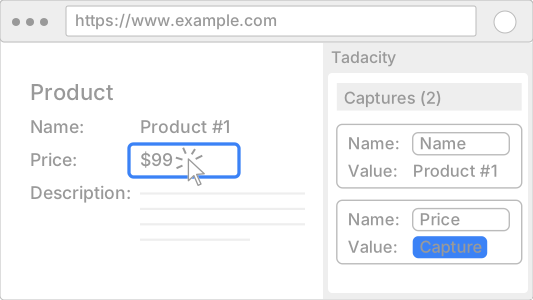
Step 1
Create a capture
Capture

Define what data you want from a website using simple point-and-click actions. Captures describe how to extract specific content—no code required.
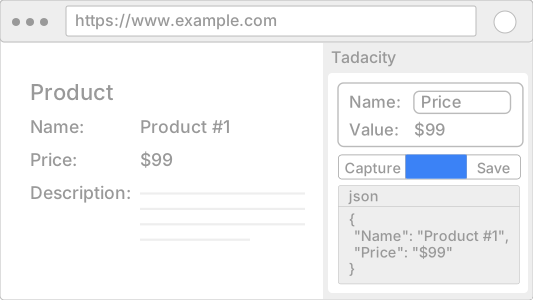
Step 2
Test exported data
Test

Preview and verify the extracted data to make sure it matches your expectations before saving it.
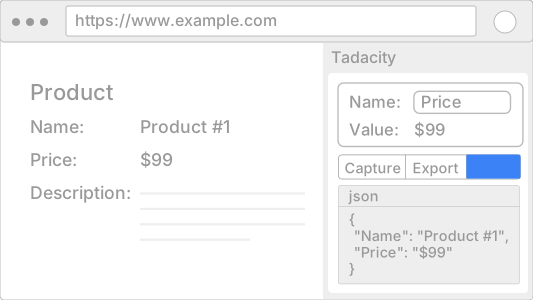
Step 3
Save your captures
Save

Save your capture to reuse it later and access it across devices and workflows.
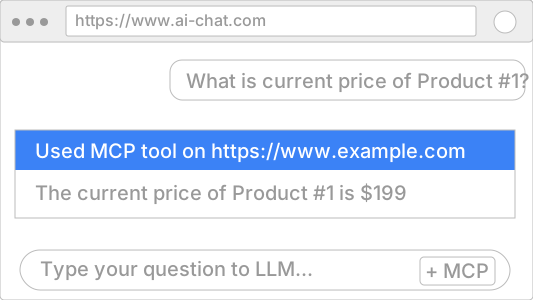
Step 4
Use it in AI workflows
Prompt

Connect your AI tools to Tadacity’s MCP server and use the captured data directly in prompts and workflows.

Captures are reusable by design, so once defined, they can power many AI workflows over time.

Pricing

Simple. Transparent. Free.

Free

No credit card. No trial. No limits on current features.

Full access to all current features
Local-first web data extraction
Cross-platform CLI and Browser Extension
MCP-compatible AI workflows

Tadacity is free to use while we continue building the future of web-powered AI workflows.
No paid plans today — and no surprises.

FAQ

Quick answers to common questions about how Tadacity works.

Tadacity is a web data capture platform that lets you define how to extract data from websites and make it available to AI tools through MCP. You create reusable captures once and use them across AI workflows—without building custom scrapers or integrations.
A capture defines how specific data is extracted from a website. It describes the structure and rules needed to retrieve content such as lists, tables, or structured sections—created through simple point-and-click interactions, without writing code.
You create captures using the Tadacity browser extension. Simply select data visually on any website and save it for reuse—no coding required.
AI tools access your captured data through MCP. Tadacity provides a local CLI that runs on your machine, executes your saved captures, and serves fresh data to MCP-compatible AI clients (such as Claude Desktop) in structured formats like JSON or Markdown.
“Latest” means the most up-to-date data available at the moment a capture is executed. Tadacity does not monitor websites continuously or stream live updates. Each time a capture runs, it fetches the current state of the page at that time.
No. Captures are created visually in the browser extension, and AI tools access the data through MCP. No custom scrapers, scripts, or integrations are required.
Captures are public by default. While browsing and reusing captures created by other users is not yet available, a discovery and search experience is planned so users can find and reuse captures over time.

Contact

Have questions or feedback? We'd love to hear from you.